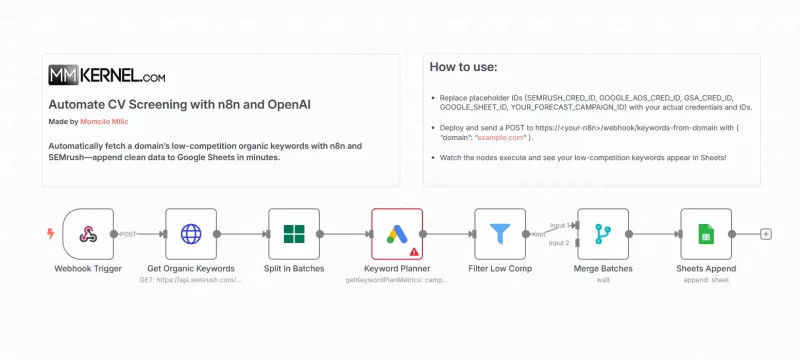
I’ll never forget the days spent combing through SEMrush reports, exporting keywords, and then manually filtering for low-competition gems before pasting them into a spreadsheet. It was tedious, error-prone, and hardly scalable. That’s why I built an n8n workflow that automates the entire process—from fetching a domain’s organic keywords to appending only the low-competition ones into Google Sheets—so SEO teams can focus on strategy instead of data wrangling.
The Challenge: Mining Actionable Keywords at Scale
Digital marketers know that not all organic keywords are created equal. High-volume terms often come with fierce competition, while perfectly tailored long-tails sit just beneath the surface. Manually:
- Exporting from SEMrush: You pull thousands of keywords.
- Scanning for Competition: You eyeball competition scores or export again for Google Ads forecasting.
- Copying to Sheets: You paste the low-competition list into your master spreadsheet.
Multiply that by dozens of domains, and the hours add up fast.
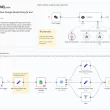
How the n8n Workflow Streamlines Everything
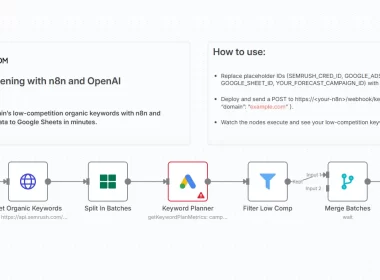
- Webhook Trigger
Send a simple POST with{ "domain": "example.com" }to kick off the flow—no manual exports required. - Fetch Organic Keywords
An HTTP Request node calls SEMrush’s API (analytics/v1/domain/organic) to retrieve up to 1,000 terms in one go. - Batch Processing
To respect rate limits, a SplitInBatches node chops the list into groups of 50 keywords. - Forecast Competition with Google Ads
For each batch item, the Google Ads node runsgetKeywordPlanMetrics, returning competition levels and search volume forecasts. - Filter for “LOW” Competition
A simple Filter node lets through only those keywords flagged as LOW competition—no guesswork. - Merge & Append to Sheets
Once all batches finish, the Merge node recombines results, and the Google Sheets Append node writes each keyword (with its monthly searches and competition index) into a designated tab.
Why This Matters for SEO Teams
- Speed: What took hours now runs in minutes, on-demand.
- Accuracy: API-driven fetching and filtering eliminate manual slip-ups.
- Scalability: Trigger the workflow for any number of domains without extra effort.
- Collaboration: The results land in a shared Google Sheet, ready for strategy sessions or content briefs.
Tips for Getting Started
- Secure Your Credentials: Store SEMrush and Google Ads API keys in n8n’s credential manager.
- Adjust Batch Sizes: If you hit rate limits, lower the batchSize in the SplitInBatches node.
- Customize Output Columns: Tweak the SEMrush
export_columnsparameter to include additional metrics (CPC, SERP features, etc.). - Automate Scheduling: Add a Cron node to run the scraper weekly or monthly for continuous insights.
Import this workflow into your n8n instance, swap in your credential IDs and sheet details, and automate your keyword research pipeline today.