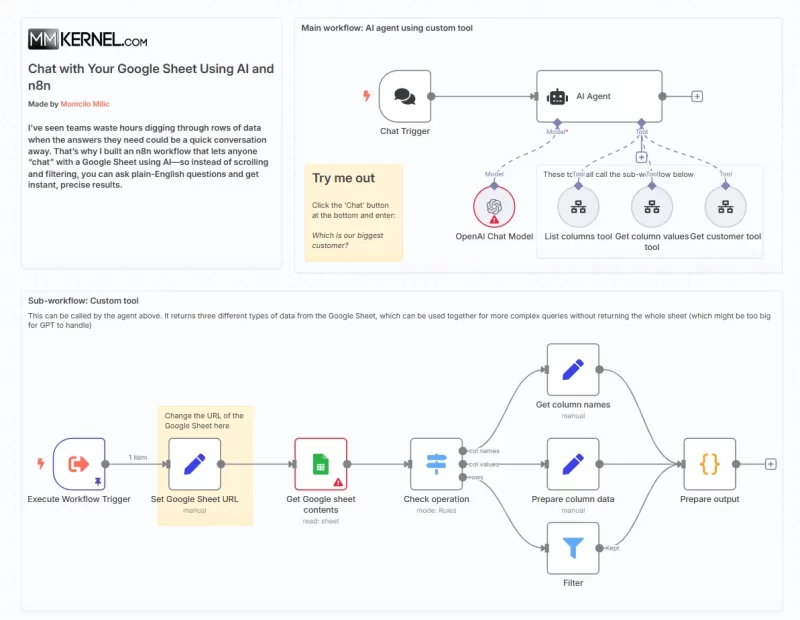
I’ve seen teams waste hours digging through rows of data when the answers they need could be a quick conversation away. That’s why I built an n8n workflow that lets anyone “chat” with a Google Sheet using AI—so instead of scrolling and filtering, you can ask plain-English questions and get instant, precise results.
The Problem: Data Hidden in Spreadsheets
Spreadsheets are powerful, but they become unwieldy:
- Endless Scrolling: Hunting for specific rows or columns takes time.
- Complex Formulas: Not every teammate knows how to write the right filter or pivot.
- Siloed Knowledge: Subject-matter experts who understand the data aren’t always spreadsheet wizards.
Imagine asking, “Who’s our top-selling product this quarter?” and getting an answer in seconds—no formulas required.
How the Workflow Works
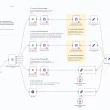
This n8n workflow turns your sheet into an AI-powered data assistant:
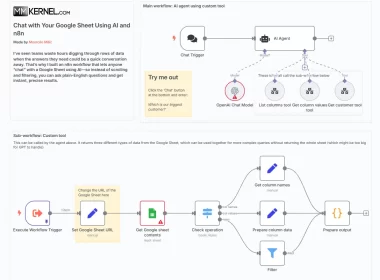
- Chat Trigger
A LangChain Chat Trigger node listens for incoming chat messages via webhook or UI. - List Available Columns
The first tool the agent calls islist_columns, which returns all column names from the sheet. This helps the AI understand the data schema before querying. - Choose an Operation
Based on your question, the AI decides whether to:- List column names
- Fetch all values for a given column (
column_values) - Retrieve a specific row (
get_customertool in our example)
- Custom Tool Sub-workflow
Each tool invokes a sub-workflow that:- Sets the sheet URL
- Uses the Google Sheets node to pull either the full sheet, one column, or one row
- Returns structured JSON with only the needed data
- AI Agent Reasoning
The LangChain agent (using a ReAct pattern) chains thoughts and tool calls, ensuring it gathers schema insights first, then fetches data, and finally formulates a human-readable answer. - Prepare & Return Response
A code node serializes the JSON result into a concise summary—be it a list of customers, a specific record, or an aggregate metric—and sends it back as chat output.
Benefits for Any Data-Driven Team
- Natural-Language Queries: Non-technical users can ask questions like “Show me all customers in Germany” without writing formulas.
- Schema Awareness: The agent always starts with a column list, reducing errors from mistyped field names.
- Performance & Cost: By fetching only the necessary slice of data (column or row), you avoid overloading the AI or your API quotas.
- Extensible: Add more tools for aggregations, chart generation, or multi-sheet joins as your needs grow.
Tips for a Smooth Roll-Out
- Secure Your Sheet: Use a service account with read-only permissions.
- Adjust Tool Prompts: Tailor the
list_columnsdescription to your sheet’s context for clearer schema introspection. - Monitor Usage: Track which questions your team asks most frequently, then consider caching popular responses.
- Enhance with Charts: Hook in a Python User-Visible node to generate quick matplotlib plots for visual queries like “Plot sales by month.”
Turn your static spreadsheet into a dynamic chatbot and empower everyone to explore data effortlessly. Import this workflow into your n8n instance, connect your Google Sheets credentials, and start chatting with your data today!